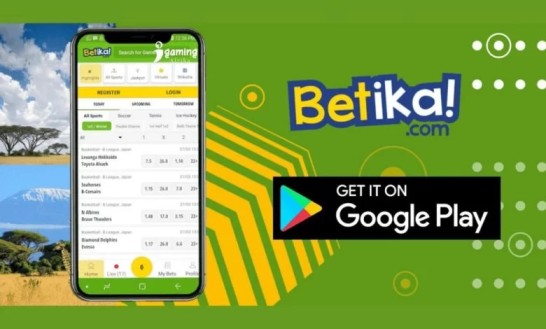
Betika has well and truly established itself as one of Kenya’s top and most well-known homegrown gaming brands. From the moment you pop open the Betika app you’ll notice the crisp ‘green-and-yellow’ themed interface – and what a relief, because this is an industry dominated by cluttered apps that just seem to get in the way. What Betika has done is put speed front and centre. The app is super easy to get around, with all the main tabs – Sports, Jackpots, Casino and that super-popular ‘Aviator’ game – right there in plain sight.
One of the things that’s really set Betika apart in the Kenyan market is their “Betika Bila Bundles” capability and the app’s built in data-saving mode – so you can browse and place bets even on a low data connection. Big plus for local users who don’t always have the best signal.
About the Company

At the helm, leading the charge is CEO Robinson Mutua Mutava. The Betika app was officially launched back in May 2017, after they’d already got their feet wet with SMS and USSD betting. And in 2023, Betika scored a major first for a Kenyan betting firm by getting their app approved for the Google Play Store.
They’re also well-known for their “Betika Na Community” initiative which is all about supporting grassroots sports all across Kenya.
Exclusive Mobile App Offer
The “Zero-Bundles” Bet is their most prized mobile offer. When you’re using the Safaricom network, you can use the Betika app to place bets without it devouring your data bundles. App users often get these lovely “Aviator Free Bet Rains” – random notifications that pop up just for app users, allowing you to grab free stakes in real-time as they happen. They’re currently offering a refund on transaction charges, for example, your first deposit of the day (e.g. KES 99) earns you a KES 8 bonus which effectively covers the M-Pesa/Airtel Money transaction fee.
How to Use the Betika App

First, open up the app and tap on “Register”. Then just type in your phone number and come up with a 4-digit PIN. After that you get an OTP (One Time Password) via SMS to verify your account – and the great thing is you don’t even need to leave the app. Next, tap the “Deposit” button at the top. Enter the amount you want to deposit and a pop-up (STK Push) will appear on your phone asking for your M-Pesa PIN. Once you enter that, the balance will reflect in the app in an instant.
Now you can browse through the “Sports” tab (soccer, basketball etc) or “Live” for all the latest games. Tap on the odds of the outcome you’re guessing and your selection will appear in the “Betslip” at the bottom. Just type in your stake (minimum KES 1) and tap “Place Bet”.
If you want to switch between the Home screen, your Bet History (“My Bets”) and your Profile section the bottom navigation bar is where to go.
See also: Betika Review
How to Win Aviator on Betika App
The Aviator game is just about the most popular “crash game” in Kenya right now – which actually makes sense since many people are trying to win big. But they’re only successful with a few key strategies.
Strategies That Just Might Work
- The “Double Bet” Trick: Place two bets at the same time, and do it the smart way. Set the first bet to cash out automatically at 1.50x to cover all costs, and then let the second bet ride till it hits a higher multiplier (e.g. 3x or 5x) to bring in some real profit.
- The 1.2x System: For some people, just waiting for the plane to reach 10x is not enough – they’re in it to win it big. So instead of waiting for something big to happen, cash out early at small multipliers like 1.2x or 1.3x. Its not exactly the most exciting way to play, but it will steadily build your bankroll over time.
- Keep an eye on that Pink History: check out the round history at the top of the game screen. If you notice there’s been no big win (specifically 10x or higher) in the last 20 to 30 rounds, don’t be surprised if one is just around the corner.
- If the plane flies away at 1.0x (basically an instant loss) three times in a row, it might be time to close the app and come back later. Sometimes, the algorithm just has these cold streaks that you don’t want to get caught up in.
How to Withdraw from Betika App
Withdrawing your winnings from the Betika app is fast, easy and directly linked to your mobile money number – so no fuss at all.
- Have a click on that Profile or My Account icon.
- Tap the Withdraw option.
- Enter the amount you need to withdraw (The minimum is KES 50, maximum KES 300,000 per day).
- Press Withdraw Now. You will get an SMS from M-Pesa or Airtel Money confirming the transaction.
If your internet is down, don’t worry, you can still withdraw by texting a simple message to 29090 – just like W#Amount.
How to install Betika app
Android
You may be able to get Betika through the Google Play Store in Kenya, but a lot of users prefer the direct download from the website – this ensures they get the latest version with all the features.
Open your mobile browser (just use Chrome), and go to app.betika.com.
click on the Download for Android button, but be aware that your phone may warn you that the file could be a bit dodgy – this is normal for any app downloaded outside the Play Store, but just tap Download anyway.
Before you open the file, pop into your phone Settings > Security (or Privacy) and check the box to allow apps from Unknown Sources.
Get into your Downloads folder, tap on the Betika.apk file, and follow the prompts to install it.
How to Install on iOS (iPhone/iPad)
Installing the app on an iPhone is a doddle – its all done through the App Store.
- Pop into the App Store and search for “Betika”.
- Make sure the developer is listed as Betika or Shop and Deliver Limited.
- Tap Get. You may have to verify with your FaceID, TouchID or Apple ID password.
FAQs
How to download the latest version of Betika app
Like we’ve said, For Android users, the most reliable method is to visit app.betika.com and download the latest APK directly, as this version often receives updates faster than the Play Store. iPhone users should simply visit the Apple App Store, search for “Betika,” and tap “Update” if a newer version is available.
I’m Kanyi Muturi and am from Tabuga, a small village in Nakuru. I have been following all sports since I was a kid and have been interested in the gambling side of sports since I was in high school. It took me a little while to get a grasp on all of the different gambling terminology and understand how confusing and complicated it can all seem when you first start.
Are you a professional gambler?
I am a successful gambler. But make no mistake about it: I’m a long-time recreational sports bettor. I’m not a professional gambler. I’m not claiming to be a professional gambler. I’ve never, to my recollection, even been acquainted with a professional gambler. And far be it from me to make the preposterous claim that following my advice will turn you into a professional gambler. It ain’t about that. Not here it ain’t. I just want to teach you a new form of recreation, a fun new pastime in what can sometimes be an unfun life.